
6 Ways to Protect Your Custom Website Images in 2026
Smart Watermarking, Data Poisoning and Ongoing Image Compliance
Published 13 April 2026
In 2026, publishing images you’ve created on your website means accepting the reality that those custom images are machine-readable by image-hungry bots searching for copyright infringement.
“But,” you say, “my custom images are safe. I created them. I own them. There’s no risk to me.” We wish that were true, but as some well-publicized cases (covered below) have shown, you can still run into problems. This article highlights several strategies to help protect your images, along with one way to track whether bots have scraped your site.
AI systems, bots and automated crawlers constantly scan public web pages. For photographers, designers, artists, site owners and content teams, this creates a distinct risk:
The potential for unauthorized AI training on your original work, which (almost unbelievably) could result in you receiving a legal demand letter.
This may sound ridiculous or even impossible when you consider that you (or someone you hired) produced your original images. You’d think so, but consider the following real-life scenario.
Scenario:
Web crawlers collect publicly available data. Depending on how that data is processed and filtered, it may later be incorporated into AI training datasets and/or stock image libraries.
So, the bots have scraped your images and those images were potentially uploaded to a stock library site.
Your custom images are machine-readable by the image-hungry bots.
Later, at some future time, when your site is crawled by an automated enforcement bot (which today seems to be more a question of when, not if), the bot discovers that you have images on your site that match images in a stock library.
Potential Result: One fine day, you receive a letter of demand for copyright infringement on your own image.
You can read more about the parallel situation of the Highsmith v. Getty Images case in The Impact of Automated Copyright Enforcement on Small Business.
Protecting your custom image portfolio today requires more than merely blocking scrapers. It requires a layered protection strategy and continuous record-keeping so that you can avoid being targeted in a copyright claim (or at least give it your best shot).
Here are some suggestions for a tactical approach:
1. Upgrade Your Watermarking Strategy
When publishing original, self-created images, basic corner watermarks are no longer enough. Modern editing tools can remove simple overlays quickly. There are still some effective ways to do watermarking. Let’s look at two.
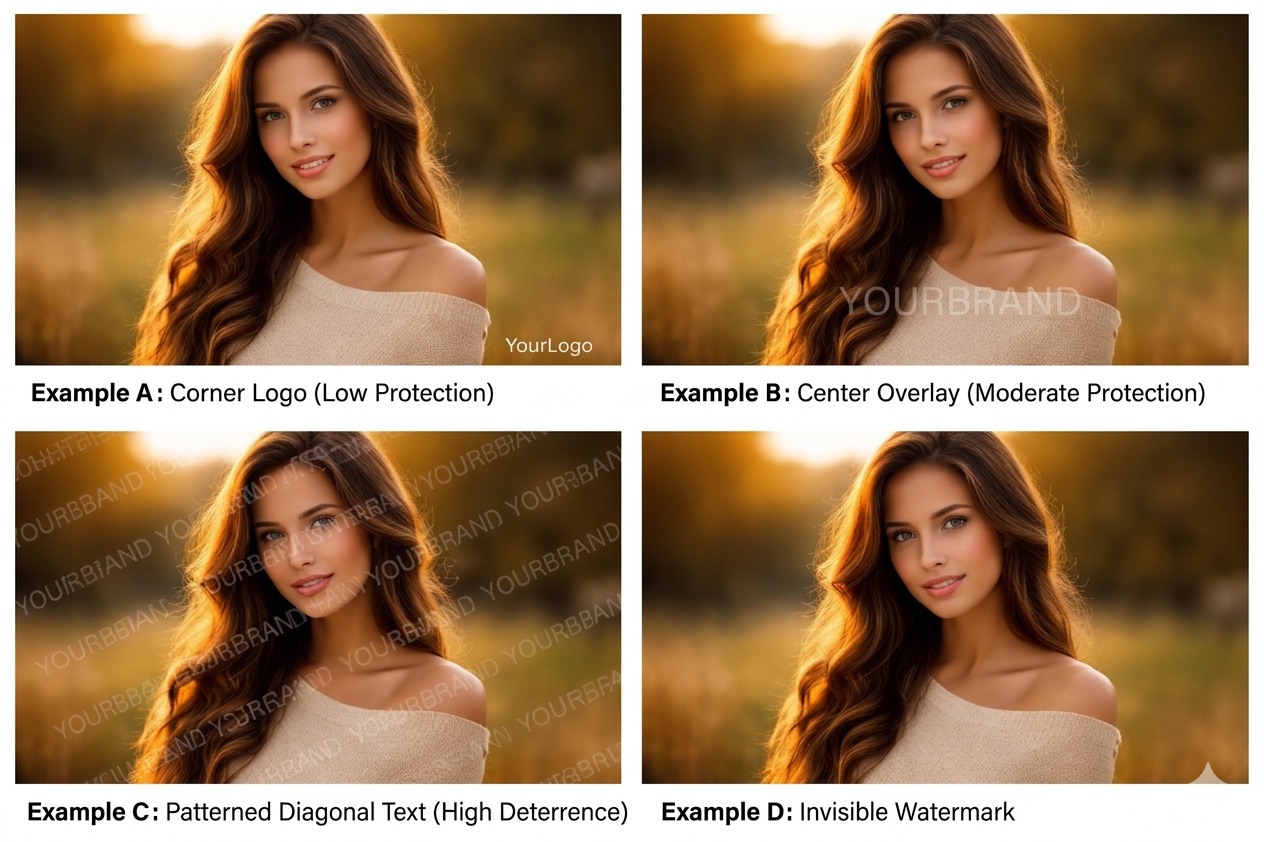
Visible Watermarks (Use Selectively, Not Everywhere)
Visible watermarks are one option. They are most effective in high-risk contexts, such as stock previews, proof galleries or downloadable media, rather than across your primary site imagery.
Yes, visible watermarks are seen by visitors. And if overused, they can negatively affect user experience. For that reason, many website owners prefer to apply them selectively:
- Across portfolio images that may frequently be reused or scraped.
- On preview versions of high-value photography.
- In marketplaces or licensing environments.
Rather than placing a small logo in a corner (which is easily cropped to remove it), more resilient visible watermarking may include:
- Semi-transparent overlays intersecting high-detail areas.
- Integrated text layered into textured regions.
- Repeating but subtle patterns across an image.
For brand-sensitive pages (such as homepages or sales pages), creators often rely instead on lower-resolution display files combined with invisible watermarking and monitoring tools.
Visible marks won’t prevent scraping, but for the bots, they reduce the usability of scraped images and signal clear ownership. They’re also the cheapest form of watermarking and are often free.
Embedded Invisible Watermarks
Steganographic watermarking is a method of embedding hidden information directly inside a digital image in a way that is invisible to the human eye but detectable by specialized software. The word steganography comes from Greek roots meaning “covered writing.” It refers to hiding information inside something else so that its existence isn’t obvious.
Unlike visible watermarks (logos, text overlays), steganographic watermarks do not alter how the image appears. The image looks completely normal, but it quietly contains embedded data within its pixel structure. The only downside is that steganographic watermarking costs more. But when you’re aiming for Jason Bourne-level stealth, that’s to be expected.
These invisible marks generally survive resizing, compression and minor edits. They don’t stop the scraping. They do strengthen authorship and authentication if disputes arise. And arise they do.
In the AI era, attribution evidence matters.
2. Consider “Data Poisoning” Style-Protection Tools
So-called “poisoning” tools such as Glaze and Nightshade, developed by researchers at the University of Chicago, introduce subtle, often imperceptible, modifications that make it harder for AI systems to accurately learn from or replicate your artistic style.
Poisoning tools degrade or distort what the bots learn. Instead of blocking access, it attempts to corrupt the training signal, causing the AI model to misinterpret styles, features or labels derived from the poisoned data.

Data poisoning sounds brutal, but in the machine-versus-machine era, this is what it’s come to.
- Glaze attempts to cloak stylistic features. To the human eye, the image looks normal. To an AI scraper, however, the image appears to be in a completely different style (for example, a charcoal sketch might look like an oil painting to a bot). This prevents models from accurately mimicking your specific artistic style.
- Nightshade is a more aggressive “poison” that targets the generative model’s understanding of concepts. If a bot scrapes enough images “shaded” to make a dog look like a cat, the model eventually loses its ability to generate dogs correctly.
These tools are not foolproof, and their effectiveness depends on how datasets are processed. However, they can make life a lot harder for the bots.
Best practice: Apply them to public-facing original images, not your archival master files.
3. Use robots.txt and AI-Specific Controls
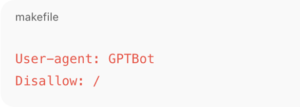
AI developers now operate identifiable crawlers. You can explicitly disallow them in your robots.txt file:
Meta directives can also signal non-consent, such as:
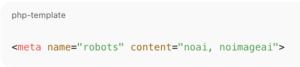
Important: These are compliance signals, not technical barriers, and not all bots will honor them.
Still, clearly declaring restrictions establishes your intent and demonstrates active governance.
4. Reduce Public Image Resolution
AI systems benefit from high-resolution, clean data, some of which may be gathered by scraper bots. To limit the exposure of your original images:
- Publish compressed display versions (1200–1600px max).
- Avoid making print-resolution files public.
- Remove unnecessary EXIF metadata.
- Avoid bulk-download access.
Lower resolution images can limit the amount of fine-grained detail available for image libraries or AI model training, while still presenting your work effectively to human viewers.

Low-resolution images have reduced training value for the bots. Today, this can be technically achieved without diminishing visual appeal.
5. Shift from Prevention to Monitoring
Even with safeguards in place, your original images may still circulate. This is where visibility and documentation become essential.
ImageVerifier scans your website pages to discover and index accessible images. It then checks those images against a variety of online resources, such as stock image libraries. If your images have been scraped and uploaded to a stock library, ImageVerifier could reveal that to you.
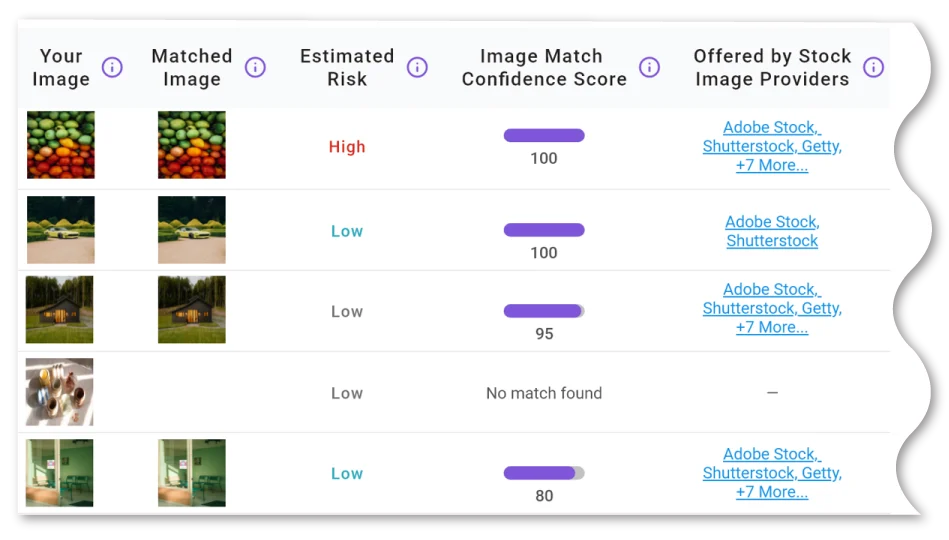
ImageVerifier organizes all your image documentation in one convenient location.
An additional benefit is the comprehensive image compliance database that ImageVerifier generates, which:
- Tracks all analyzed images over time.
- Provides detailed risk ratings.
- Includes image-match accuracy scores.
- Functions as an ongoing compliance tool.
By regularly scanning your site with ImageVerifier (or at least whenever you upload new images), you have documentation that proves the original image on your site predates a claim that it appears on theirs. Your documentation could effectively be a polite form of “take a hike” and potentially shut down a claim filed against you.
6. Build a Layered Protection Framework
No single tactic stops scraping. For stronger defenses, you may want to consider combining multiple approaches, such as:
Each layer reduces risk differently. Some deter scraping. Some preserve attribution. Combined, they offer you power, instead of guesswork.
- Strategic visible watermarking.
- Embedded (steganographic) identifiers.
- Style-protection tools.
- robots.txt AI directives.
- Reduced-resolution publishing.
- Reverse image monitoring.
Your documentation could effectively be a polite form of “take a hike” and potentially shut down a claim filed against you.
The Bigger Picture: Control, Not Fear
At this stage, nobody can completely prevent automated systems from accessing your public-facing content. But you can:
- Reduce misuse potential.
- Track where your images appear.
- Document ownership.
- Act quickly when risk emerges.
In 2026, portfolio protection isn’t about hiding your work. It’s about managing it intelligently.
When you combine layered technical safeguards with continuous compliance monitoring, your portfolio becomes not just a showcase, but a controlled asset.
And in the AI era, control is power. Grab it.
Disclaimer: The information on this website is provided for general information purposes only and does not constitute legal advice. Nothing on this site creates an attorney–client relationship. Copyright laws vary by situation, and you should consult a licensed copyright attorney for advice regarding your specific circumstances.
Welcome to the Anti-Troll Tribe!
Thanks for exploring ImageVerifier. You’ll be the first to know once we go live. We’ll send you an email notification as soon as we’re ready. Please fill out the form below to join the waitlist.
"*" indicates required fields