

The Google Images Trap: Why “I Found It Online” Doesn’t Mean You Can Use It
Published 27 January 2026
You (or someone in your organization) found the perfect picture for your blog, social post or presentation — it’s on Google Images, so it must be fine to use… right?
Google Images is not a free buffet of visual content.
Well … That’s the internet equivalent of assuming you can borrow your neighbor’s car just because it’s parked on the street. (If you already knew this, you may be surprised to hear that probably the majority of webmasters, web designers, company execs and website owners don’t know this.) The purpose of this article is to clear up various misconceptions regarding online images.
The Big Misunderstanding
Google Images is not a free buffet of visual content. It’s a search engine, not a stock photo library. It shows you images that already exist on other websites. That means:
- Google doesn’t own the images.
- Google can’t grant you permission to use them.
- Most of those images are copyrighted.
- Access does not automatically grant permission.
When you right-click and “save image as…,” you might actually be copying someone else’s protected work — whether or not it displays the little copyright symbol (©) or is watermarked.

Don’t be guilty of image theft.
Why So Many People Fall Into This Trap
It’s easy to make this mistake. Here are a few reasons why:
1. Convenience Breeds Complacency
Downloading an image from Google takes seconds, which kind of tricks people into thinking it’s harmless.
2. No Flashing Red Warnings
Unlike stock photo sites, Google doesn’t slap a giant “THIS IS COPYRIGHTED!” label on every image.
3. Confusing Filters
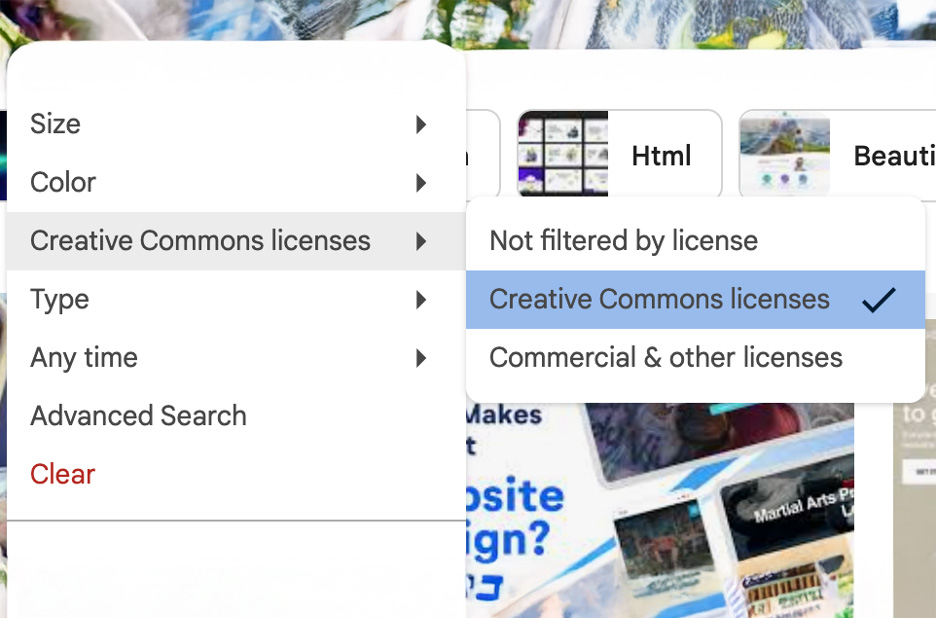
Google does have a “Usage Rights” filter that helps you find public domain or Creative Commons content — but most people have never touched it (or even know what those terms mean).
4. Social Media Culture
We share images like candy — retweeting, reposting, remixing — and it’s created a false sense of “everything online is fair game.”
The Legal Reality Check
In many cases, using images found on Google without permission can constitute copyright infringement. And yes, even “just one image” counts.
Many site owners often discover dozens (sometimes hundreds) of unlicensed images lurking on their web pages.
- Copyright disputes may quickly become very expensive, even for a single image.
- Removing the image doesn’t erase its earlier use — the owner may still reach out and ask for payment. That said, if you did use a copyrighted image without the needed licensing to do so (even if by accident), taking it down immediately upon discovery may potentially reduce your risk of trouble and may potentially reduce the amount it might cost you.
- You may be asked to take the image down and discontinue its use.
Note: Nothing in this article constitutes legal advice. Seek licensed legal counsel if you need/want legal assistance in any given situation.
Real-World Ouch Moments
Plenty of bloggers, small businesses and even nonprofits have received “nastygrams” (an accurate description of demand letters and emails) regarding Google Images.
In some reported cases, website owners have faced lawsuits for similar reasons. For example, one website owner used a picture that appeared on multiple sites — assuming that meant it was free to use. Spoiler Alert: It wasn’t. The original photographer sued all the sites at once. Ouch.
In the world of image copyright, ignorance isn’t bliss — it’s expensive.
“Free” doesn’t mean “risk-free.”
“Free” doesn’t mean “risk-free.”
Tips on Reducing Risk With Google Images
To navigate image use more confidently and avoid common pitfalls, consider the following three tips.
Use the Usage Rights Filter
- Search for an image on Google.
- On the Google Images page, click Tools → Usage Rights.
- Select “Creative Commons licenses.” This filters for images that purport to have open licensing. However, this is not a legal guarantee. A Creative Commons license does not mean the image is copyright-free. Rather, it means the owner has granted permission for use under specific terms (such as providing attribution). Always click through to the source website to verify the license type and ensure the image wasn’t mislabeled by a third party.
- Once you’ve found an image you like, click on the image to visit the page where it’s displayed. It’s important to double-check the license details on the source page. Is there a copyright or watermark? If so, you can’t legally use the image without the creator’s (or owner’s) permission. Is there a link to a Creative Commons license with terms you’re agreeable to? Before you choose to use an image, you have to know that it’s safe to do so.
Trace It Back
Another tool you can use is Google’s reverse image search to find the original source and see who owns it.
1. Right-click on the image and select “Search with Google Lens.” In a panel on the right of your screen, all the matching locations of that image will be displayed.
2. Click through the images to see if you can find the one that was published first, or one that should be safer to use, such as from a public domain site, a stock library (paid or free), a Creative Commons license, or similar.
Never be tempted to use an image that you cannot definitively prove is safe to use. “Just one time” is no defense.
Verify the License
Some third-party sites sometimes falsely present copyrighted images as free to use. Whether that’s a blatant lie — or they just didn’t know — is anyone’s guess. If possible, confirm usage rights directly with the copyright holder or through official channels. A really good way to check the image risk level is by using ImageVerifier.
Meet ImageVerifier
Sometimes, even the most careful site owners and managers slip up. That’s where ImageVerifier can help — like a digital detective for your site images.
ImageVerifier can:
- Scan images on your site.
- Identify possible matches with copyrighted images in major stock databases.
- Flag images that may lack adequate licensing information.
- Highlight images with elevated risk ratings based on the information detected, so that you can take appropriate action as needed.

ImageVerifier is like a digital detective for your site images, helping you verify licensing.
Many site owners often discover dozens (sometimes hundreds) of unlicensed images lurking on their web pages. ImageVerifier can help you in your quest to find such images by speeding up the search (dramatically) and providing data and an estimated risk level on each image scanned.
Better Alternatives to Google Images
You don’t have to rely on Google Images when there are plenty of safer (usually), creative alternatives.
- Create your own: Snap photos or design graphics. These days, most smartphones take pretty decent photos. Alternatively, check out AI-generated options.
- Use free sources such as:
- Buy stock licenses: Try Adobe Stock, Shutterstock or DepositPhotos.
- Hire a photographer: Get custom images with clear contracts.
- Keep scanning: Use ImageVerifier regularly to help you maintain good image sourcing practices.
Note: In certain circumstances and for certain uses (particularly, but not limited to, commercial use), you may need a legal release (of some variety) to use an image that contains someone’s recognizable likeness, their private property and/or their copyrighted or trademarked material. This is a separate topic. Just be sure to consult with a licensed attorney before you go use someone’s picture and plop it on your website.
Final Frame: Think Before You Right-Click
Google Images isn’t evil — it’s just misunderstood. It’s a search tool, not a permission slip. You wouldn’t copy text from someone else’s blog without crediting them, so don’t copy online images either. Chances are good that someone else owns them.
Understanding image copyrights can help you avoid unnecessary risks. Protect your brand, your wallet and your peace of mind by verifying before you use. Because in the world of image copyright, ignorance isn’t bliss — it’s expensive.
Disclaimer: The information on this website is provided for general information purposes only and does not constitute legal advice. Nothing on this site creates an attorney–client relationship. Copyright laws vary by situation, and you should consult a licensed copyright attorney for advice regarding your specific circumstances.
Welcome to the Anti-Troll Tribe!
Thanks for exploring ImageVerifier. You’ll be the first to know once we go live. We’ll send you an email notification as soon as we’re ready. Please fill out the form below to join the waitlist.
"*" indicates required fields